Upgrading
To upgrade the Lightning version in your PROS project check the latest releases ([here]https://github.com/HectorAlonso18/Lightninglib/releases)
Install Lightning
Install lightinglib@x.x.x.zip and put it in your program folder using the file explorer.
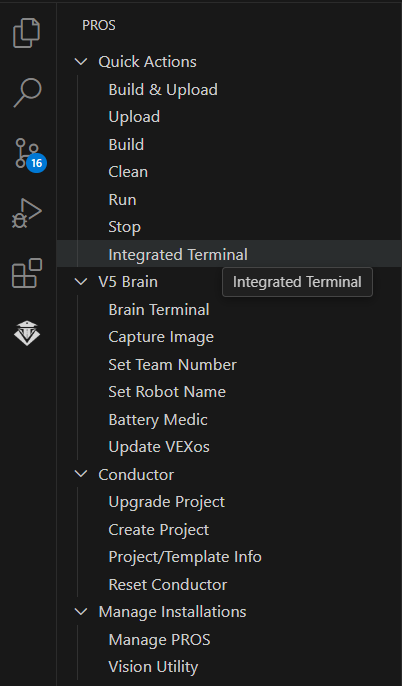
Open the Integrated Terminal in PROS
- Click on the PROS logo located in the left side of your screen.
- Then click on Integrated Terminal.
Apply Lightning
In the Integrated Terminal type the next commands.
Fetching lightning
PROS Terminal
pros conduct fetch lightninglib@x.x.x.zip
Applying lightning
PROS Terminal
pros conduct apply lightninglib
Verifying installation
To verify if Lightning is now in your project follow the next steps:
- In the left side of the screen, select the PROS icon.
- Then in
Conductorclick onProject/Template Info.
A message would appear including the templates that are in your project. Check that lightning appears.
There you go!
Lightning will be updated 🥰.